Especially when managing large and complex websites, we speak more often of “what Google will index” rather than “what Google can see”. However, Google’s encounter with your site follows many of the same steps that your browser does. And similar to your browser, Googlebot must request a series of files to properly build a page, and to “see” everything that you want it to see.
Without covering any of the advantages or disadvantages of particular JavaScript implementations or rendering strategies, I will share some of the things that tend to go wrong in the encounter between a search engine crawler and your website.
The rendering process
In determining how search engines encounter page contents, there is a critical distinction between content at two different moments in the rendering process.
The first stage: when a URL is requested, the server responds with the HTML document.
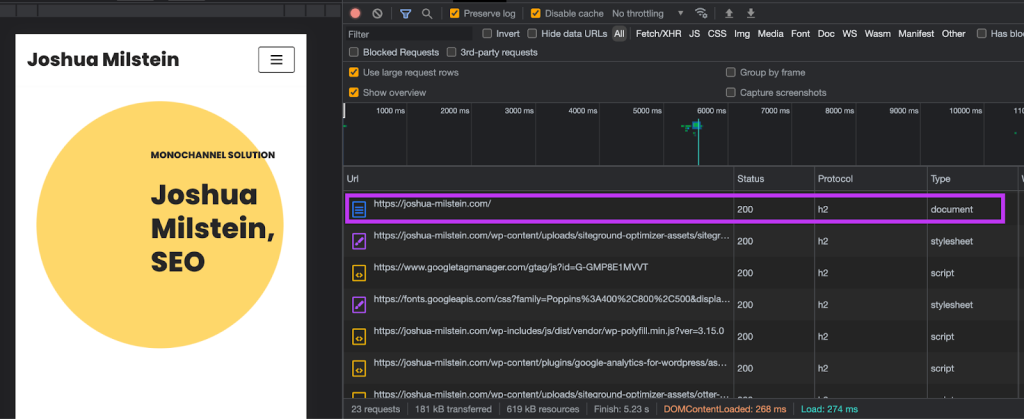
This document contains the “source”, “raw”, or “response” HTML. This is the version of the page you see when you right click to “view page source”. At this stage, the page has not yet been rendered with the full content and complete visual representation that will most likely reflect the final version of the page.
The second stage: Googlebot (or your browser) parses the source HTML, and following links that are returned from the server, requests a series of JavaScript, CSS, and other resources. By executing the instructions in those resources, it builds the DOM, which is a representation of the page “unpacked” into an elaborate structure.
For SEO purposes, the relevant approximation of the DOM is the “rendered HTML”. With respect to search engines, you can look at the rendered HTML as a final accounting of all the main HTML contents of a page. The rendered HTML should include all the text and links which define the content of the page and its relationship to all other pages on your site.
Where things tend to go wrong
While Google’s position is that it can load JavaScript content, there are some qualifications to this.
- In order to be “accessible” to Google (i.e. crawlable or indexable), content must be sent from a server to a client without any user interactions. Google cannot click, scroll, or hover. Where a JavaScript implementation relies on user inputs to an already loaded page to show critical content, that content will not be present in the rendered HTML.
- Just because Google can does not mean that it will. Google may elect to not access and crawl the rendered version of a page. Rendering is expensive, and not necessarily spontaneous.
- Google isn’t the only search engine in the game. In terms of ability to access content via JavaScript, it is probably a safe assumption that other crawlers will product outcomes which are equal to or less satisfactory than Google.
Ways to Spot Rendering Issues in SEO
When in doubt about whether Google can spot your key content, there are a few basic steps you can take, and in no particular order
Step 1: Check the raw HTML and disable Javascript
Most rendering issues arise from JavaScript. When content is reliant on JavaScript to be rendered to the page, it is important to pay attention to if, how, and when a client (like Googlebot) can access your important content.
The fastest ways to know what content will most likely be crawled by Google and which has JavaScript dependencies (and therefore some contingencies in the rendering process) are to check the HTML source and to disable JavaScript on a page.
Checking the source HTML
Right click to View Source.
Notice how on certain sites, critical content like navigation, pricing, or product details are present at this stage. Amazon is an example of a site which serves all critical product data directly in the HTML source, even though information like pricing can fluctuate constantly across millions of pages.

The HTML source for this page includes some of the following:
- Site structure: the two “menu bars” at the top of the page. However, the more extensive flyout content under “All” is not included in the source HTML.
- Dynamic product data: pricing is always delivered in the source HTML
- UGC: Q&A sections and product reviews are delivered in the source HTML
Depending on the complexity of your site and how data is loaded to the page, having all critical content loaded in the raw HTML can be quite a feat to accomplish. Amazon’s ability to deliver all this critical content quickly is exceptional.
Disabling Javascript.
This is similar to checking the source HTML, but asks the same question the other way around. This method allows you to get a strong visual sense for how the page behaves without JavaScript
To disable go to dev tools > Settings > Debugger > Disable JavaScript
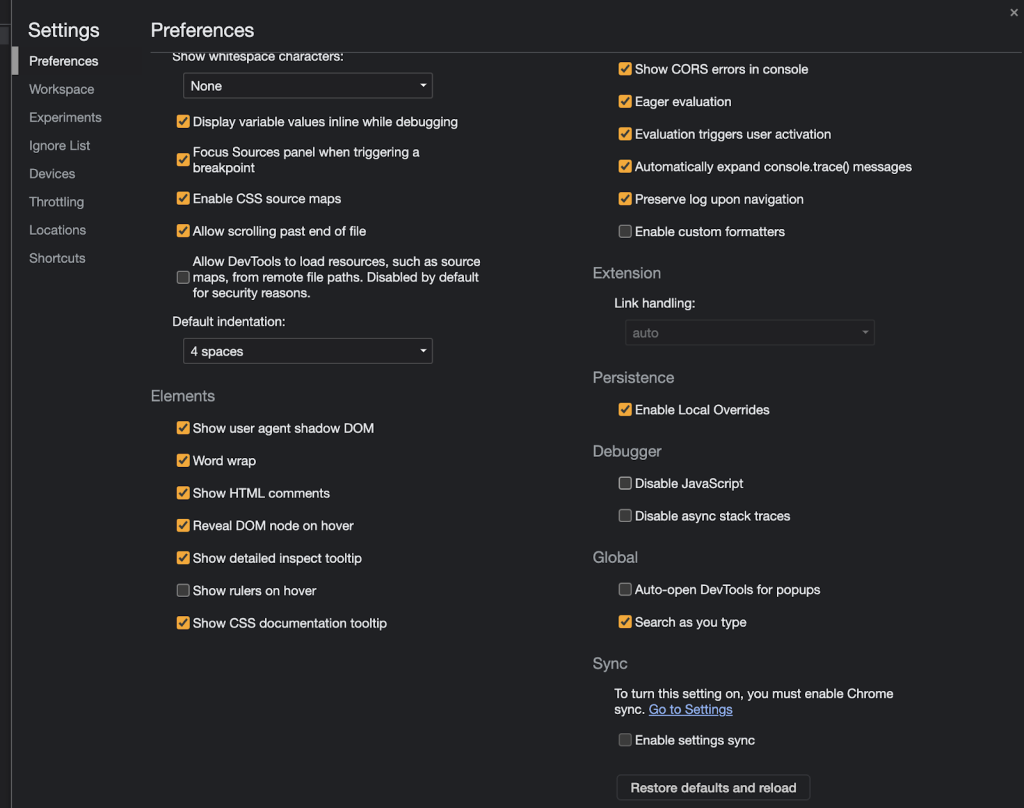
From here, you can view how sites render without JavaScript
With JavaScript disabled, sites like Nike might not look like much.
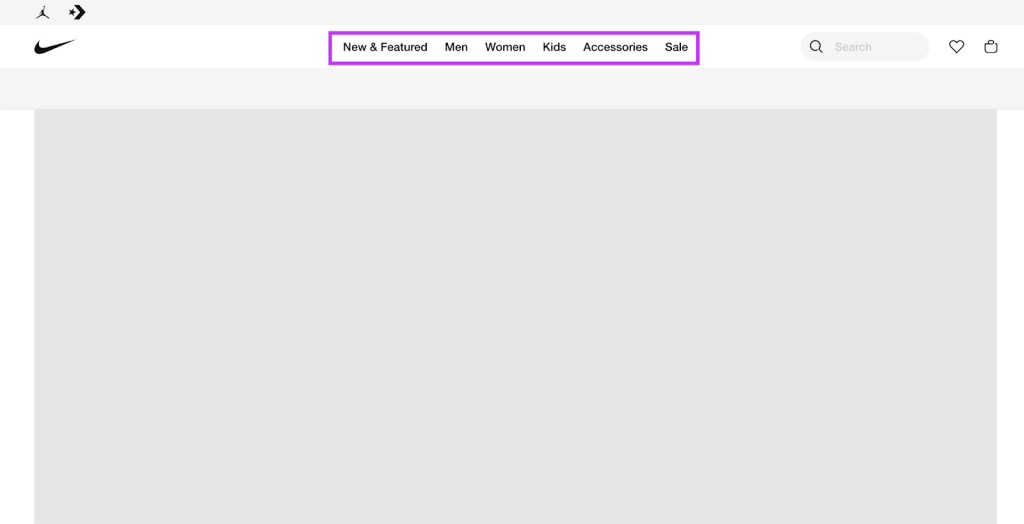
But for Nike (as for Adidas or Reebok for example), while its menu may not be interactive with JavaScript disabled (and so features like dropdown won’t be enabled), most of the important links are still found in the HTML source.
And while sites may have their critical sitewide links in the HTML, their actual inventory pages (product pages, PDPs, etc.) may be missing critical information without JavaScript.
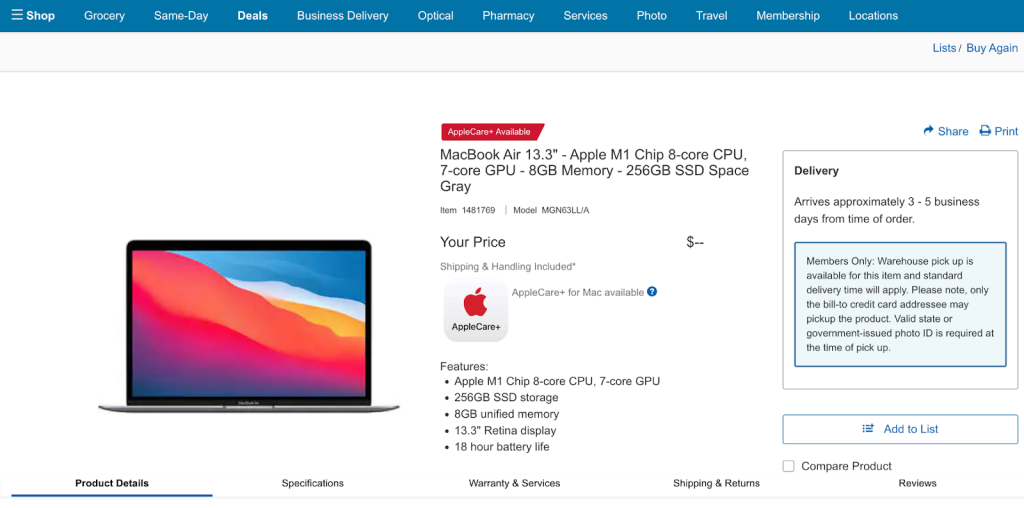
For example, without JavaScript this Costco product page does not populate critical content, such as pricing or reviews.
The URL Inspection Tool:
The Search Console’s URL Inspection Tool provides the most definitive available version of the rendered page as Google forms it. The version of the HTML provided here is the rendered HTML. The formula is as follows: Any content in the HTML panel is known to Google; any content not in the HTML panel is not known to Google.
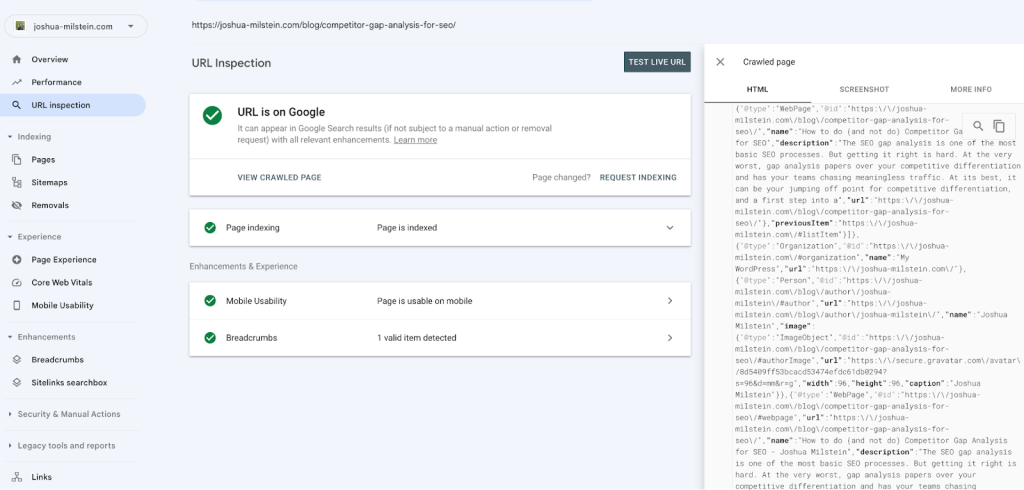
When in doubt, search the rendered HTML in this panel to discover which content Google is rendering on pages that it has decided to index.
A great way to actually see the rendered HTML is to use this code to see the page in the browser, through the following steps:
- copy the full HTML file from the HTML tab of of the URL Inspection tool
- open the Elements panel of Dev Tools
- right click on the line containing the opening of the code (the first line after the line that opens with a <!> tag) and click “Edit as HTML”
- paste this HTML in and click away
The shortcoming of the copy/paste method: pasting Google’s version won’t necessarily stop dynamic JavaScript from populating as you interact with the rendered page, changing the DOM and giving you a false impression of what is visible onpage. This is just for a neat visual – for the definitive version of the page, stick to the <script>, and search the content of the HTML tab above to look for the relevant content. .
Mobile Friendly Test
In theory, the Mobile Friendly Test is similar to URL Inspection Tool.
Some of the advantages of using this tool
- You don’t need to be a GSC property owner to test a page
- It provides a log of which resources couldn’t be loaded (similar to the URL Inspection Tool)
- It provides a log of JavaScript console messages (similar to the URL Inspection Tool’s “Live Test”)
Some of the disadvantages:
- It is sensitive and generally runs into problems loading resources more frequently than GSC
- A “live test” such as the Mobile Friendly Test (or the “Live Test” in the URL Inspection Tool) tells you what could be, not what is
Place critical content in the raw HTML
The more complex a site’s rendering strategy is, the more likely it is that, without specific attention to the relevant SEO documentation, some critical content won’t render properly. And at scale, missing links, text, or other product detail can lead to unrealized or lost traffic.
Avoiding this is easy in principle, but in practice may take some work. When thinking about how content is “delivered” to Google, there is a basic rule which is always key to follow above all else: As much as possible, all critical content should be delivered in the raw HTML of a page.
Rendering issues in SEO come from relying on JavaScript to build important page contents after the raw HTML has been shipped. The simplest way to avoid these is by shipping more of the good stuff sooner.
Some resources on JavaScript rendering
If you’re just broaching the topic of JavaScript for SEO for the first time, here are some additional useful resources:
- a great introduction to rendering strategies from Chrome DevRel
- on client-side and server-side rendering
- from Google documentation on dynamic rendering and SEO