There is a race on to make writing code easier, through the use of new code search platforms or AI-backed solutions like new code writing assistants or code complete tools. These solutions are directed to solving a critical need for developers, who regularly leverage search on the open web, repositories, company documentation, and forums, in search of ways to easily debug, borrow, or complete code.
While “code search” has some well-documented problems (addressed below), it can also be seen as a strategic beat on where your critical contents are being made available to customers – or being made available to customers by you. And for companies whose documentation includes guides or specific pages which double as developer marketing, code search can be an extremely valuable part of a growth funnel from open search.
Some things to consider about code search
Some of the challenges developers face in code search itself will be reflected in your own work. For example researchers often find variations of some of the following problems expressed in the paper “What do developers search for on the web?”:*
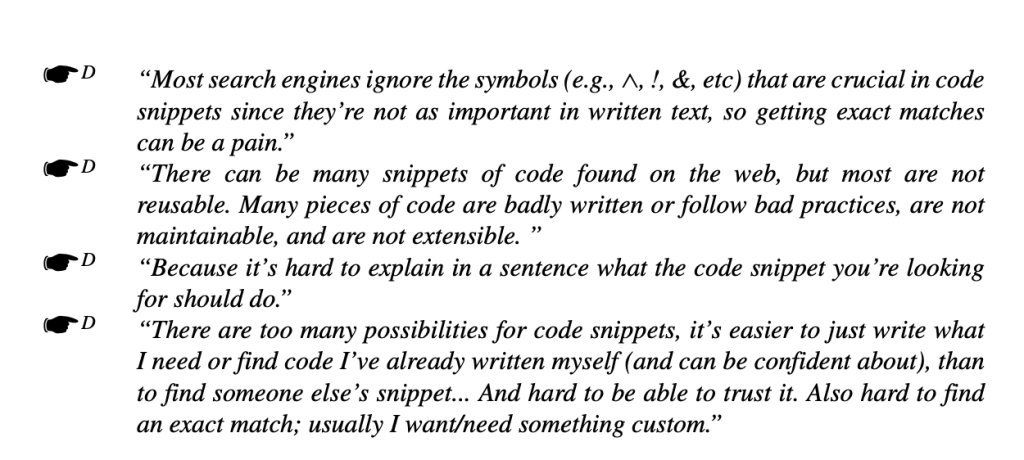
Code search is often unreliable, doesn’t respond to input of symbols, and doesn’t return relevant results. Because of this, researchers exploring query logs consistently find high rates of query reformulations in code search, indicating poor results and hard to satisfy searches.† In order to solve for problems of relevance and reliability, the vertical code search engine Sourcegraph actually introduced a variant of Google’s PageRank to search results.
Provisioning for the variability and relevance of searched code is complicated for SEO as well. For starters, most code searches are unlikely to be found in 3p keyword research tools like Semrush. Instead, as a jumping off point you will likely have more success leveraging data from your Search Console account. While a lot of queries will not be available, you will almost certainly turn up better data this way. Within this data, it will take a degree of code knowledge as well as domain expertise to separate the wheat from the chaff.
Query taxonomies to understand search intent
The most powerful strategic lens you can take to keyword metrics is undoubtedly search intent. Being able to apply search intent labels to keywords at scale, and in a domain-specific way, is the foundation of good SEO analytics as well as content strategy.
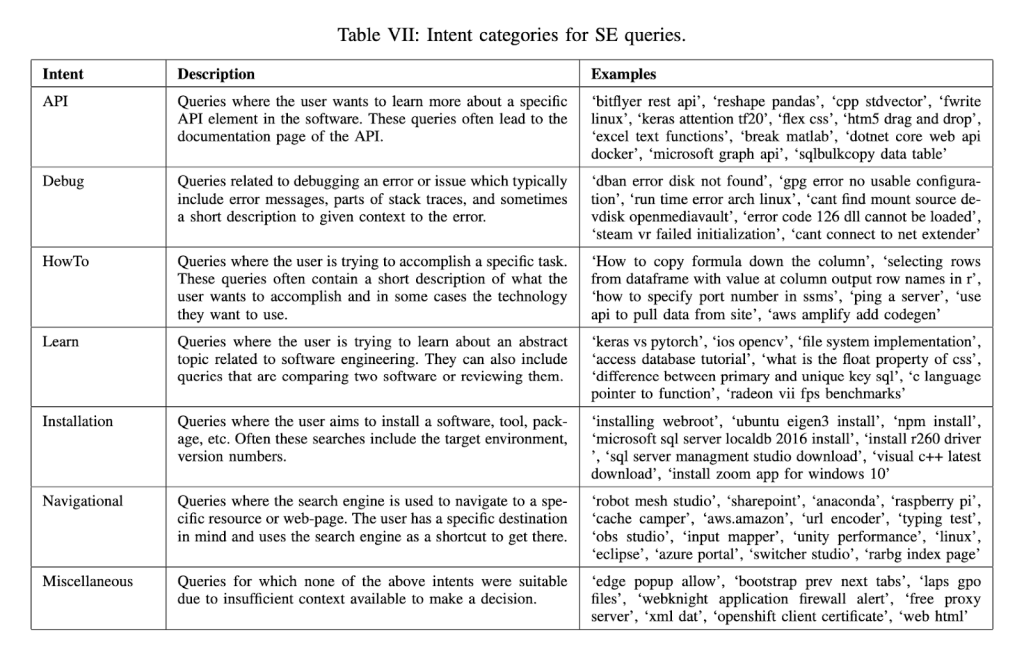
It is important to point out that general search intent labels returned from 3rd part tools aren’t enough. Understanding search intent is always going to be domain-specific and involve a strong focus on your customers and your expert understanding of their purchasing journey. But at a higher level, the goal is to find a sort of middle ground: a taxonomy of search intent which can get you most of the way towards doing this work at scale. Luckily, researchers at Microsoft have provided a fantastic place to begin the labeling for code search.‡
Based on their research into query logs for Stack Overflow, the authors of this paper a taxonomy of code search intent:
Helpfully, the authors also provide a set of terms (“Heuristics”) which frequently appear in code searches, reflective of specific search intents:
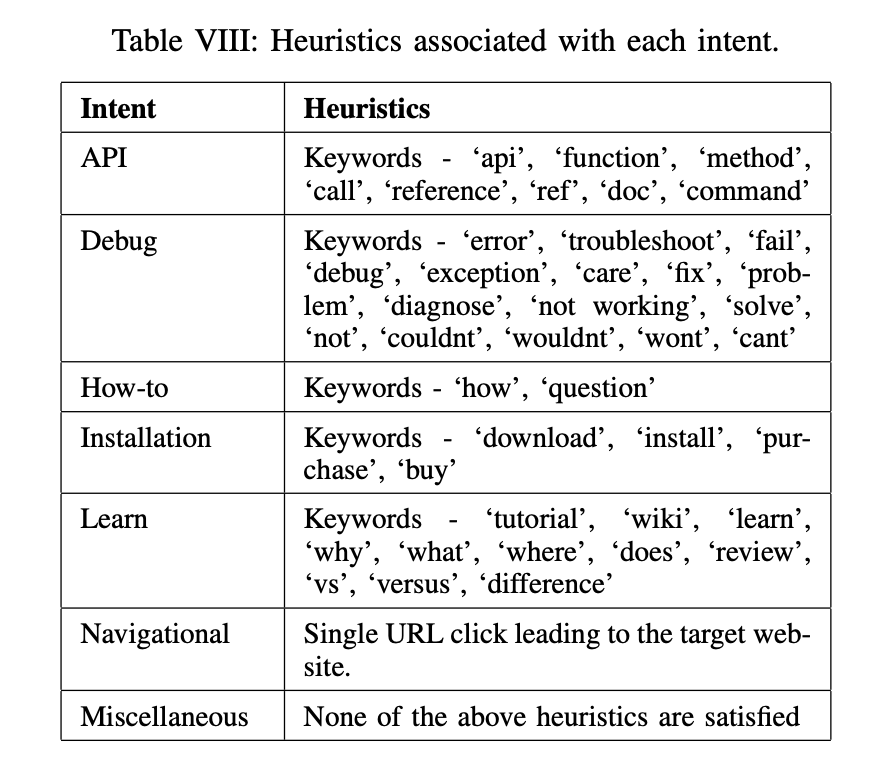
As I suggest below, this provides a great starting point for labeling, but there is more work you can do in order to ensure that your customers’ actual needs are being accounted for.
Classifying your queries
I recommend accessing your Search Console and filtering for URL paths matching your technical documentation. This will provide you with a high level view of how your customers are using search, and how your pages are performing.
You can import the above taxonomy into your keyword analysis using the method detailed below:
- Pull data from the Search Console using the GSC API, or if you do not have access, the Search Analytics for Sheets extension. This produces your most critical datapoints in one sheet, whereas GSC exports split it out across several tabs. If you do not have GSC access, or you have a better rank tracker, you can use that instead. Make sure to filter for relevant URLs.
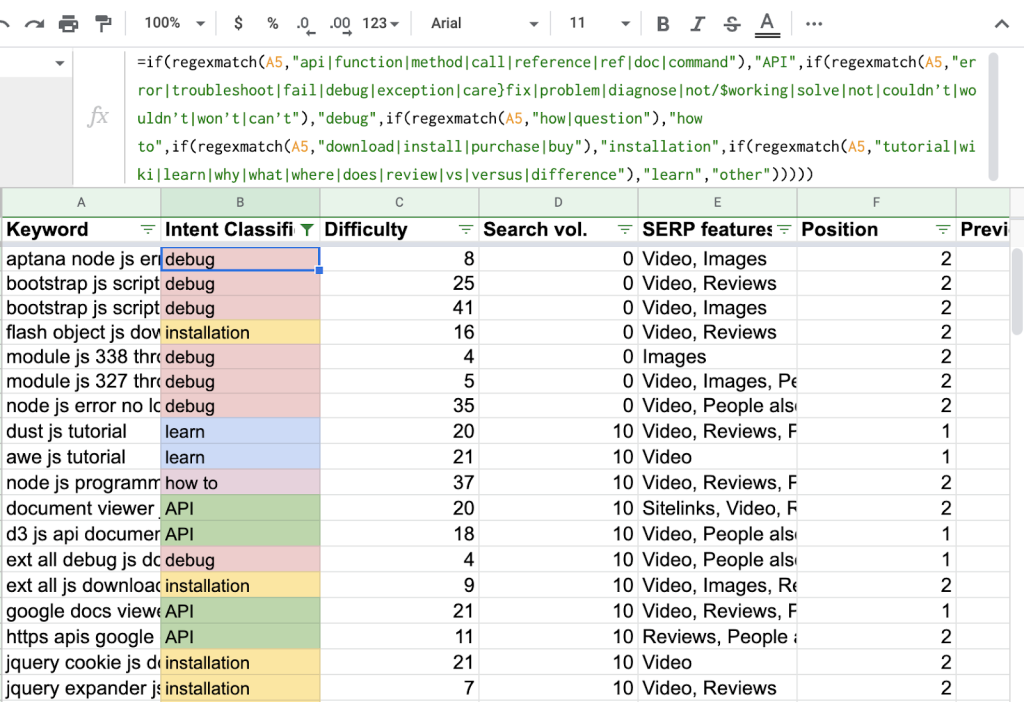
- Open a new column in your sheet, and insert the following snippet into that column. Drag the formula down through the column or encase it within an array formula. The formula:
=if(regexmatch(A2,"api|function|method|call|reference|ref|doc|command"),"API",if(regexmatch(A2,"error|troubleshoot|fail|debug|exception|care}fix|problem|diagnose|not/$working|solve|not|couldn’t|wouldn’t|won’t|can’t"),"debug",if(regexmatch(A2,"how|question"),"how to",if(regexmatch(A2,"download|install|purchase|buy"),"installation",if(regexmatch(A2,"tutorial|wiki|learn|why|what|where|does|review|vs|versus|difference"),"learn","other")))))As an example, I have taken a set of 1,000 keywords for Github’s domain, with some filtering for words, wordcount, rank, and other attributes. Applying the above method can help to quickly classify large and unwieldy query data such as this set according to their search intent, based on the contents of the words in each keyword.
To this method, I recommend adding the following label classifications (in separate columns).
- Focusing on modifiers: For stronger semantic analysis, I recommend adding another category, which is “implement” (with a regex like “^implement|^integrate”). You can either make a new label, or define these terms within either the “how to” or “installation” labels.
- Focus on branded query patterns: Your brand, other brands, and non-branded. This can be defined in a few ways. If you are AWS, brands (or products) that appear in your searchers’ queries may be quite extensive, so preparing a list and using a text editor to format it in regex can be helpful. Take note also that the meaning of “branded” might extend to the actual contents of the code snippets, and not rely on the inclusion of a brand or product name in the query. You can use a variant of the above formula to incorporate both types of branding into your intent analysis, for example:
=if(regexmatch(a2,”[your brand name]”), “your brand”,if(regexmatch(a2,”[code for your API or SDK]”), “[code for your API or SDK]”. - Focus directly on code snippets: Label the code itself, refining according to domain-specific knowledge. Certain code snippets can potentially tell you a lot about what is actually taking place in the query. For this reason, as I recommend below, you will benefit from bringing developers or those who know their needs into the conversation. If you are able to access this sort of data, use it.
How to Incorporate Code search into your SEO strategy
1. Bring experts into the conversation
First and most important: you should bring developers (or customer-facing colleagues with knowledge of developer customers) into the conversation. You want to be able to understand what you are looking at, and critically, what a searcher is trying to solve for.
Being able to understand the meaning of code searches is important. There are two basic reasons for this.
The first is that code search on its own is a highly generic activity, and as acknowledged above, not always very accurate, especially in the case of Google. To make a contribution, you (or whoever is helping you) need to be able to distinguish relevant from irrelevant queries. Of course, your keyword data will likely be highly noisy, as Google backfills search results with only vaguely relevant results, in the process showing your pages for queries irrelevant to your brand.
The second reason is that there are cases in which more generic-looking searches may have very specific problem-relevancy to your company’s product or service. A search for a particular disambiguation of code may reflect a potential customer early in a “problem-awareness” stage, and solving that problem with targeted content may present an opportunity to offer them a solution that goes beyond the specific solution presented in the content that you create for them.
To do this effectively, developers (in practice, technical content writers, sales engineers, et al.) should help you understand your queries and map them to your customers’ journey. With that intelligence in hand, you can apply the logic of a marketing funnel (or awareness stages, or growth loops, or whatever) to your technical content. Practically: it is a basis from which to turn your keyword data out for content strategy, rank monitoring, and more.
2. Create learning content which solves your customers’ most pressing issues
Understand that some intent is less well satisfied than others. You can’t really calculate click entropy on your own – but you can get a strong intuitive sense for the kinds of contents that generally go unsatisfied:
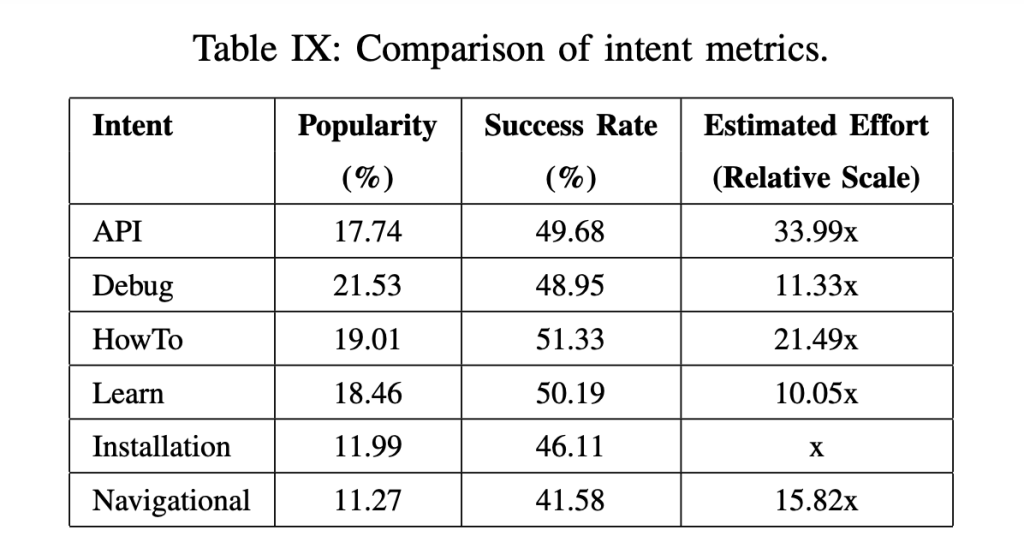
If you have worked with developers to articulate an understanding of what sort of “funnel stage” is represented by a given query, you have great intelligence on what queries are best targeted with which sorts of content. Here are a few examples:
- Searches with labels [how to] + [no brand]. This may be an opportunity to target searchers with a blog post which captures potential customers at a problem-awareness stage. In other words, you show them how to solve generic problems which may inhere in your space and can be best treated by a more longform piece of content such as a blog post, rather than within your technical content.
- Searches with labels [how to] + [your brand]. This is an opportunity to fill a gap in your own documentation – especially if it’s being filled by someone else on the SERPs.
- Searches with labels [learn] + [your brand]. Depending on whether it’s your brand, another brand, or no brand, you can see this as an opportunity to create evaluational content (e.g. “us vs them”), developer guides, or other content.
Find gaps in technical content (competitor comparison)
A consideration of search data across various codebases, partner integrations pages, forums, etc. can point up shortcomings in your own technical content.
You can use the intent classification method specified in this article to perform a competitor gap analysis for specific queries. Note that this will not be viable out of the box for many if not most of the queries you may want to examine using a keyword research tool. To be able to monitor the relatively longtail (or better put: untracked) keywords in this space, some customization is necessary. I recommend the following process: cluster your “first-party” keyword data based on the top few results, together with third party data on competitor sites, then use a rank monitoring module in a popular keyword research toolset or custom rank monitoring solution.
When you have your findings, you can use those to point up gaps in your technical content. And, leveraged along with internal search tracking (where you may actually be able to measure “click entropy” more directly), you can make recommendations for filling in critical gaps in your documentation.
Conclusion
Writing about SEO for technical documentation, I pointed out how for many SaaS companies, organic search is actually quite important for technical documentation. For a company with an API or SDK product, separating marketers from developers and using SEO (and other marketing efforts) only to target marketers (or to target developers only over marketing channels, with marketing materials, etc.) can amount to neglecting your end-users and current customers – precisely where an SEO strategy could make a difference: your technical content. It effectively cedes your SEO strategy to a false view of how search works in your industry, who customers are, and how people search.
A properly executed SEO strategy for technical content can help surface gaps in technical content, support a content strategy built around customer needs, and give visibility to areas where competitors, partners, Github repos, or StackOverflow threads may be answering critical questions that you should or could address yourself.
- *Xia, Xin, Lingfeng Bao, David Lo, Pavneet Singh Kochhar, Ahmed E. Hassan, and Zhenchang Xing. “What do developers search for on the web?.” Empirical Software Engineering 22, no. 6 (2017): 3149-3185.
- †Cao, Kaibo, Chunyang Chen, Sebastian Baltes, Christoph Treude, and Xiang Chen. “Automated query reformulation for efficient search based on query logs from stack overflow.” In 2021 IEEE/ACM 43rd International Conference on Software Engineering (ICSE), pp. 1273-1285. IEEE, 2021.
- ‡Rao, Nikitha, Chetan Bansal, Thomas Zimmermann, Ahmed Hassan Awadallah, and Nachiappan Nagappan. “Analyzing web search behavior for software engineering tasks.” In 2020 IEEE International Conference on Big Data (Big Data), pp. 768-777. IEEE, 2020.