
Keyword research is hard. To know what you need to target for a given topic, campaign, or website, you need to cover a lot of data points, ranging from the highly generic (data given in third party keyword tools) to the highly domain-specific (what your customers want to see).
Turning research out into content strategy is just as challenging. Once you have found your keywords, ranking for them requires knowledge of the SERP landscape: what content type actually ranks for a given keyword. This is critical to understand, as targeting a keyword with the wrong template or content type can easily lead to wasted efforts: expecting a product page to rank where a blog post is currently ranking, for example, may be a losing proposition.
Of course the URL which is currently in position one is not the only factor in understanding what will rank. The current rankings are not static – there are regular adjustments to the rankings for most keywords. In addition, not all current rankings should be taken as cannon, including at the level of expected content.
In general, however, understanding what Google chooses to rank for a given keyword is a pretty reliable guide to knowing how your content will fare. It’s a data point which belongs aside a number of others that determine fitness to rank:
- The popularity and competitiveness of a query
- How strong a domain is in general
- How strong a domain is in a specific thematic area
- The suitability of the content for the query (which we are trying to “reverse engineer” or at least understand here).
Now on to how to handle this information.
Wrangling ranking pages from keyword data
SEOs deal with keyword research tools. These are a fact of life, and suffer from a number of weaknesses in how they provide data.
To understand ranking content at scale, you need a way to neatly export and handle keywords along with the URLs that rank for them. And that can be tricky, as major keyword tools like Semrush, Ahrefs, or SERanking split their keyword data regions between keywords and domains.
There are often some workaround, however, which simply require a bit of wrangling. I will show how to do this in Semrush.
Set up a Keyword Manager (or equivalent)
If working in Semrush, The first step is placing all the keywords you want to examine into the Keyword Manager module. This is a necessary step, because of the “Top Competitors” feature, which allows you to export ranking pages along with keywords.
As an example, I began by simply importing the top 100 keywords returned from the Keyword Magic tool into a Keyword Manager list:

Within the Keyword Manager module, there is a Top Competitors column. By default, on import this data is always blank and needs to be updated. Click on the blank square over the Keyword column and then Update:
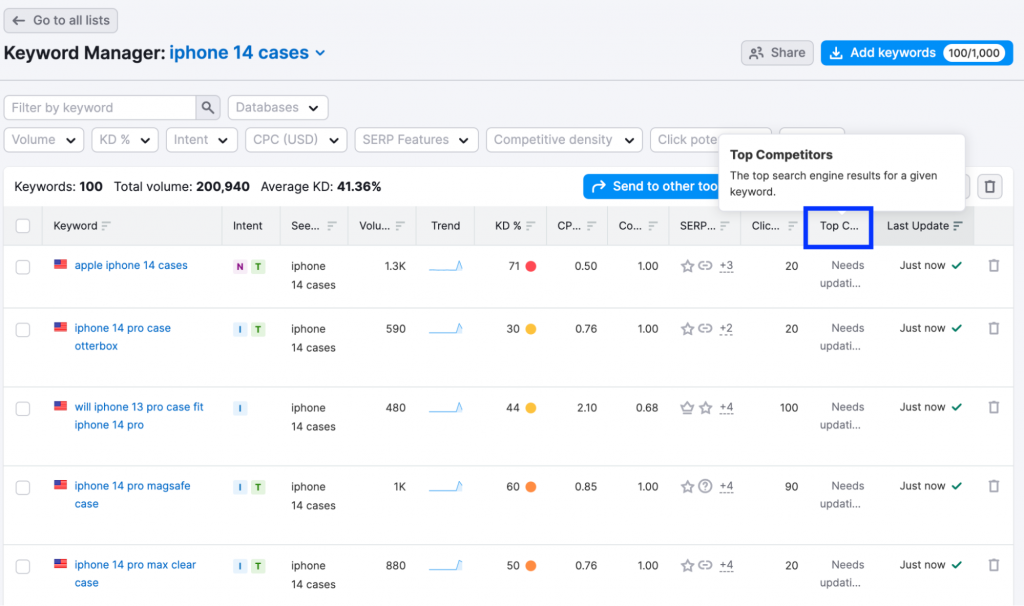
After it updates, you will have a handy list of the top 10 ranking pages available for each keyword.

From here, you can export your Keyword Manager to a spreadsheet. In the spreadsheet, you will find that the URLs are all listed in a single cell on the righthand side.
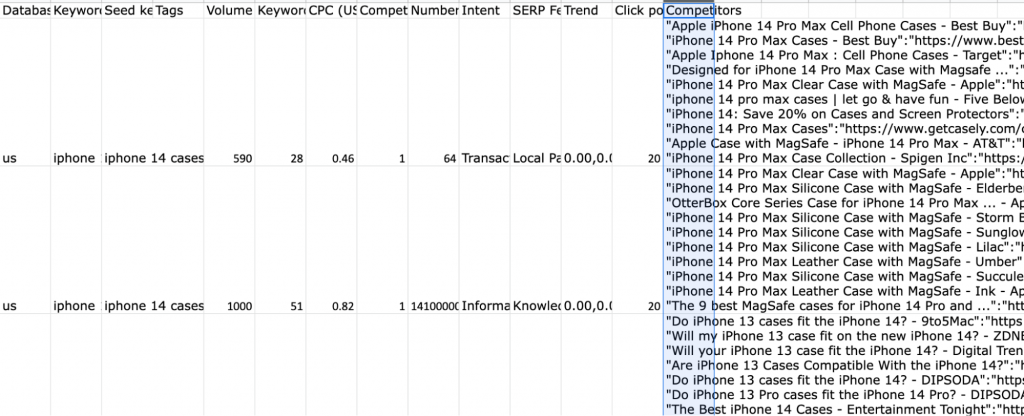
Since this is inconvenient for analyzing search data at scale – for understanding who is ranking and especially how they are ranking – you can use a SPLIT formula to “unpack” these cells. In this case, you can split on a quotation mark, as it is a convenient delimiter for separating meta title and URL data, which are otherwise packed together.
After doing so, simply label the column now containing the top ranking URL with “Top Ranking URL”.
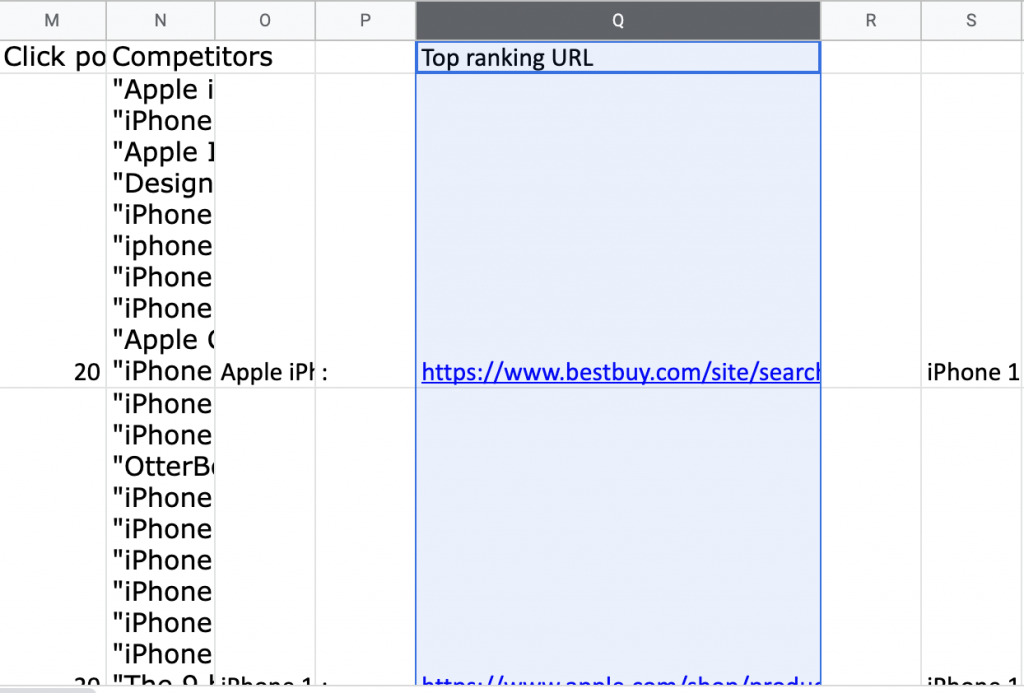
Open a new worksheet, and enter the following QUERY function:
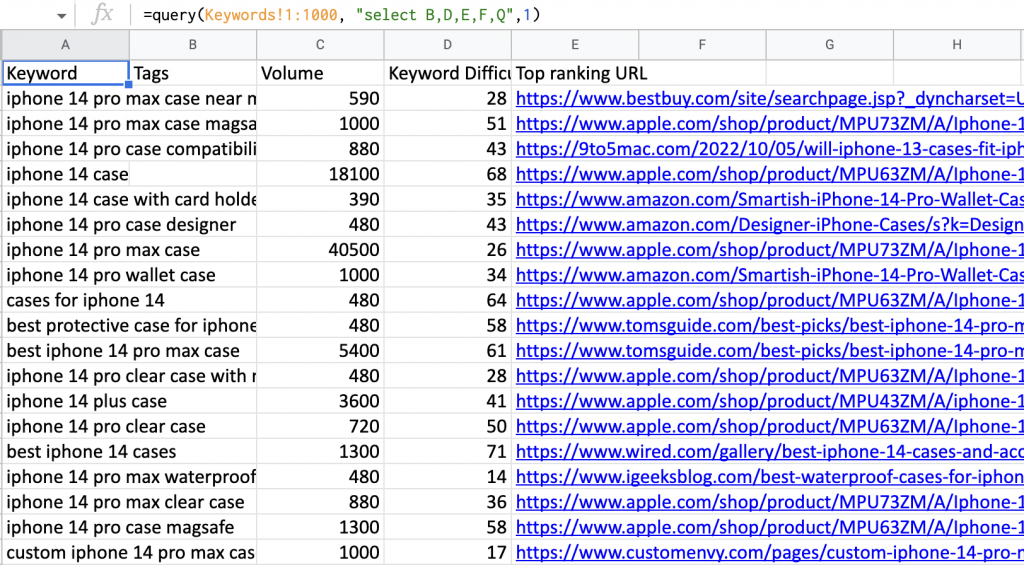
=query(Keywords!1:1000, "select B,D,E,F,Q",1)
In this case, the QUERY function selects for certain columns from your original sheet, as well as Column Q, which contins the “Top Ranking URL” for this page.
Simple as day – you now have keywords aligned to their ranking pages:
You can go a bit further still, labeling these according to content type and domain.
Labeling by content type
Luckily, in most industries most sites have conventions for defining their URL paths. PDPs are likely to contain some sort of “productdetail” string, or be in a subfolder like /shop/, /products/, or /product/. Blog posts are likely to be under paths like /blog/, /resources/, or /articles/. You can take a quick look at your data or apply your domain knowledge to understand the patterns, then produce a simple formula to produce labels according to URL path:
=if(regexmatch(E3,"product"),"PDP",if(regexmatch(E3,"accessories"),"accessories page",if(regexmatch(E3,"collections|otterbox|searchpage"),"category page",if(regexmatch(E3,"tomsguide|9to5mac|cnet"),"review",if(regexmatch(E3,"blog"),"blog","other")))))
Now you have a convenient way to outlay the actual page template or content type. It took some adaptation to the URLs in question to make this useful. In many cases, the URLs conform neatly to some sort of convention – in others, you can simply know at high level that Toms Guide pages can be safely labeled as a “reviews page”. It’s imperfect, but a good start.
From here, you have a convenient window into what sort of content is “expected” for a given keyword – and intel on what sort of content you would need to write to rank for it:

Even this output (on account of the formula behind it) is imperfect. But with some sustained attention and fine-tuning, you can produce more reliable labels which can capture the nuances of ranking patterns in your space.
Understanding Ranking Content is A Critical Part of Content Strategy
Understanding search intent requires approaching keyword data from a variety of different angles. Knowing the actual (templated) content that ranks can be a game changer whenever you are working with keyword data at scale, assessing your options for keyword strategy, and evaluating your opportunities to bring your customers onpage. Supplement the tactics covered here with deeper knowledge of your industry and specific brands in order to turn up stronger insights which are useful for your domain analysis and keyword strategy at scale.